User Management
User List
- Shows Username and the Roles array applied to each user.
- Actions column provides ✏️ edit and 🗑️ delete for each entry.
Creating a User
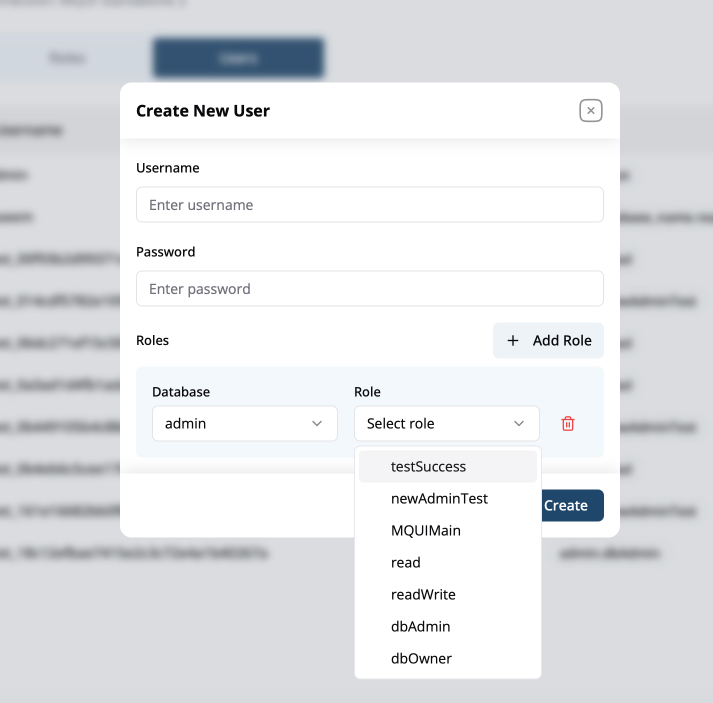
- Click Create User (top-right).
- Username – Case-sensitive MongoDB username.
- Password – Secure password for database authentication.
- Roles section:
- For each assignment choose Database and Role from drop-downs.
- Click Add Role to append multiple role lines (e.g., read on one DB, write on another).
- Press Create to save.
Editing or Deleting Users
- Edit (✏️) – Update password or adjust role list.
- Delete (🗑️) – Removes the user from the database after confirmation.
Best-Practice Notes
- Principle of Least Privilege – Start with minimal actions (
find) and broaden only when required. - Separate Admin Tasks – Keep administrative roles (
dbAdmin,dbOwner) limited to a small roster of users. - Audit Regularly – Use the Users tab to review stale accounts and the Roles tab to prune unused custom roles.
- Naming Convention –
<env>-<scope>-<access>(e.g.,prod-sales-read). Helps quickly identify intent.
Quick Reference
| Task | UI Path | Icon / Button |
|---|---|---|
| Switch database for RBAC | Top-right Database Context | ▾ |
| Create custom role | Roles tab → Create Role | ➕ |
| Filter role list | Roles tab → Filter dropdown | ▾ |
| Create user | Users tab → Create User | ➕ |
| Add extra role to user | Create / Edit User modal → Add Role | ➕ |