Role Management
Role List & Filters
- Filter dropdown (upper-right of the list) lets you choose:
- All roles (default)
- Built-in roles only
- Custom roles only
- Built-in roles are tagged Built-in and cannot be edited or removed.
- Custom roles display ✏️ (edit) and 🗑️ (delete) icons in the Actions column.
Creating a Custom Role
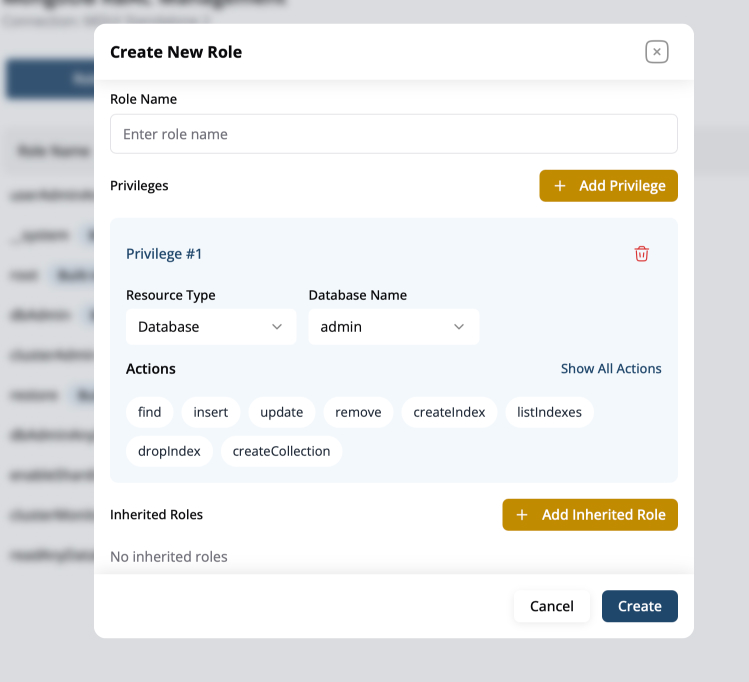
- Click Create Role. A modal titled Create New Role appears.
- Role Name – Provide a descriptive identifier (e.g.,
analyticsRead). - Privileges – One or more privilege blocks; each block defines:
- Resource Type:
Database,Collection,Cluster, orAny Resource.
- Database / Collection selectors (contextual to the resource type).
- Actions:
- Common choices include
find,insert,update,remove,createIndex,listIndexes. - Click Show All Actions to reveal the full list of MongoDB actions.
- Common choices include
- Resource Type:
- Click Add Privilege to define additional blocks (e.g., grant read on one DB, write on another).
- Inherited Roles – Optionally click Add Inherited Role and select existing roles to inherit their privileges.
- Press Create to save the role.
Editing or Deleting Roles
- Edit (✏️) – Re-opens the role modal pre-populated so you can adjust privileges or inherited roles.
- Delete (🗑️) – Permanently removes a custom role after confirmation. Any users solely dependent on that role will lose privileges.