Sharing a Connection (Step-by-Step)
- Right-click → Share Connection on any saved connection.
- Add Team Members – search by name / email, then select.
- Role Type – choose MongoDB Built-in Role or Custom Team Role.
- If Custom, pick the desired role from the dropdown.
- Click Share Connection.
Under the hood
A SharedConnection document is created storing:
connectionIduserIds[]roleIdimmutable: true
No part of the MongoDB URI is exposed to recipients.
Managing Shared Connections
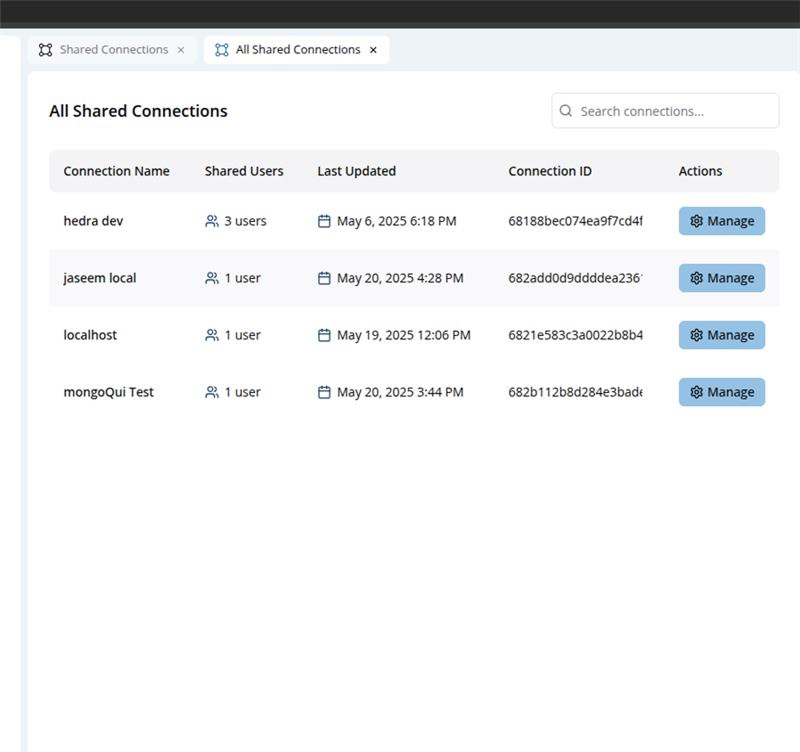
- Shared Connection List – Sidebar → Shared Connection → All Shared Connections.
- Columns: Connection Name | Shared Users | Last Updated | Connection ID | Actions.
- Manage opens Shared Connection Access where you can ✏️ edit a user’s role or 🗑️ remove a user.
- Changes apply in real time; users see new permissions on their next query.
Default Role Assignment
- Edit the source connection.
- Navigate to Sharing → Default Role.
- Pick the role that should auto-populate in the share modal.
Great for high-turnover projects that reuse the same permission set.
Sharing setting and permissions
Security & Compliance
- Tamper-proof – Non-owners see a read-only banner; edits are blocked.
- Audit Logs – Every share / edit / revoke is logged with actor, timestamp, and diff.
- Soft Delete – Removing a user marks the entry inactive for 7 days before hard purge.
- Encryption – Connection URIs stored with AES-256-GCM using your Org’s key.
Best Practices
- Least Privilege – default to read-only; grant write only when required.
- Naming Convention –
<env>-<role>-<scope>(e.g.prod-analytics-read). - Quarterly Review – audit dormant shares in the Shared Connection List.
- Credential Rotation – update the original connection; all shares pick up the new password instantly.
Troubleshooting & FAQs
Q: Teammate can’t see the connection I shared.
A: Confirm they belong to your Organization and that their email matches. Check Shared Users count and assigned role.
Q: Why can’t I delete a shared connection someone else created?
A: Only the connection owner or an Org Admin can revoke or delete it.
Q: What happens if I delete a Custom Role that is in use?
A: You’ll get a warning listing affected shares; map them to another role before deletion.
Q: Does this replace MongoDB’s own RBAC?
A: No. MongoQUI sharing is an additional layer; the database still enforces its own user/role model.
Related Features
- MongoDB RBAC Module – For on-cluster auth & authorization.
- Connection Manager – Create, categorize, and test connections.
- Audit Logs – System-wide event tracking for compliance.
Next Up: Learn how to Export & Import Data with field-level transformations.